

HR Management· Core module
Kreativstaff
48 HR pages, one login, and a mobile app for every employee
Kreativstaff handles the administrative side of employment: who works here, when they worked, what they are owed and what they have asked for. Every part reads the same record, so a leave day approved on Monday is already deducted from the balance and already reflected in that month's payroll.


- Tier
- Core module
- From
- From Rp 150.000 / month
- Mobile app
- Kreatime, included
48
HR pages, from clock-in to KPI review
8
request types, one approval queue
5
BPJS programs calculated automatically
1
mobile app included: Kreatime, free with the module
Inside the app
A real screen from the app.
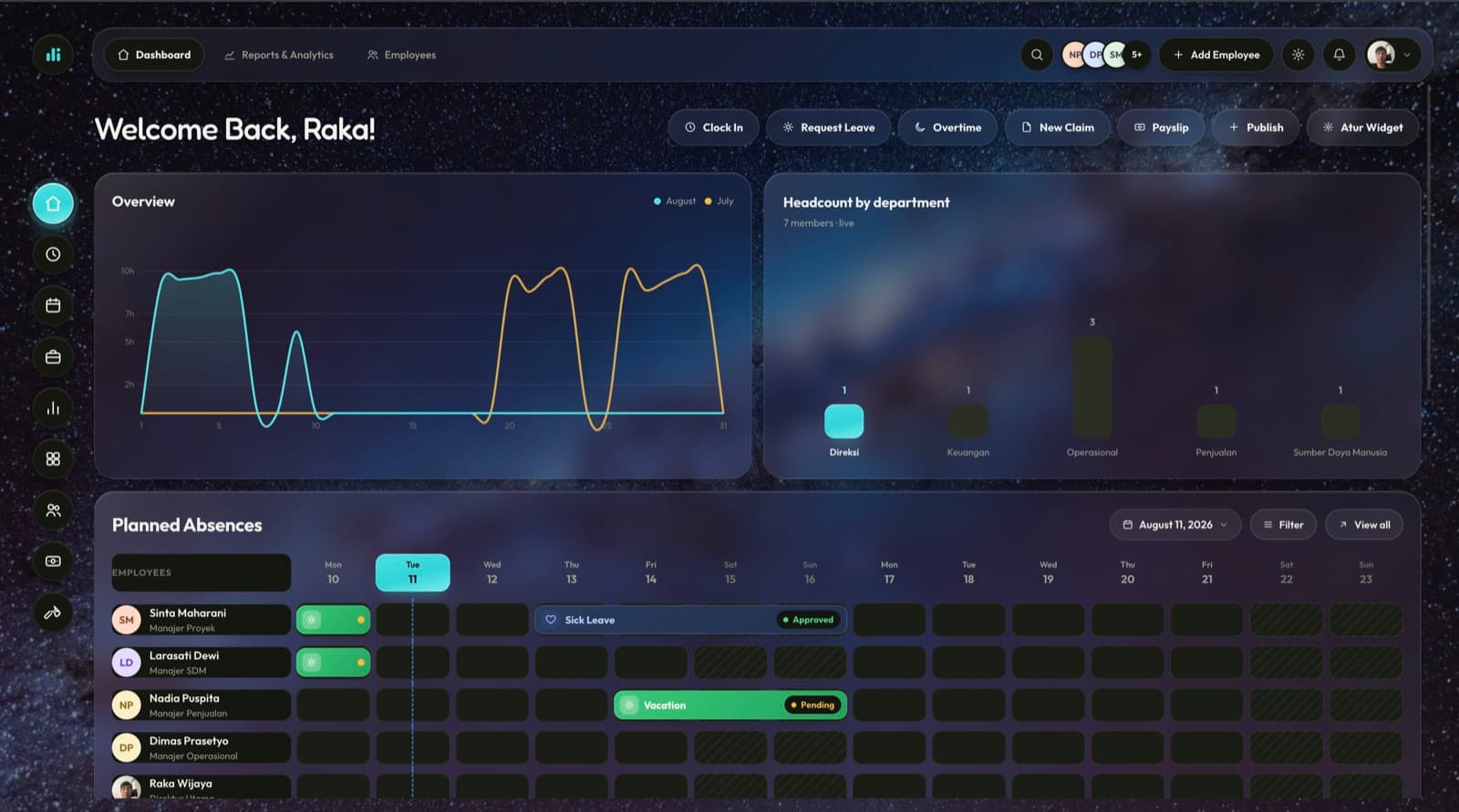
Widgets the admin arranges: clock-in, leave, overtime and claims from one bar.
Headcount by department, live from the same employee record payroll reads.
Planned absences as a calendar band, so an approval is made against who is actually in.
What it takes over
The paperwork of employing people, as one connected record.
One employee record, a clock-in that works from the office or a phone, a request queue that reaches the right approver, and a payroll run that turns all of it into payslips. It also covers the parts that help you keep people: training records, review cycles, goals, and a KPI system built for Indonesian corporate scorecards.
One approval, four consequences
- Monday: a leave day is approvedThe request leaves the queue with an approver's name attached, not a status someone typed.
- The balance is already down a dayQuota rules belong to the request type, so the deduction is not a second manual step.
- The attendance sheet reflects itNobody is marked absent for a day the company already agreed to.
- That month's payroll knowsThe run reads the same record, so the payslip needs no correction after the fact.
What it does
Six areas, and the rules inside each one.
Everything listed here is available in the module today.
Attendance and shifts
Clock in from the web or the Kreatime app, checked against your GPS location and a face scan, on a schedule you set per office and per shift. Late arrivals and early departures carry a note instead of being silently marked. If a phone clocks in while offline, lateness is judged from the moment the button was pressed, not from when the connection returned.
- GPS
- Face scan
- Shifts per office
- Works offline
Requests and approvals
Eight request types, each with its own form and quota rules, landing in one approval queue instead of eight different inboxes. Chains escalate on their own when an approver is away, and a manager can delegate the whole queue before going on leave.
- Leave
- Overtime
- WFH
- Corrections
- Shift swaps
- Business trips
- Official letters
- Reimbursement
Payroll and compliance
PPh 21 with the TER method and the December reconciliation that catches up the difference, five BPJS programs with the right caps applied, overtime under PP 35/2021, THR under PP 36/2021, and salary components you define yourself. Each component is marked for whether it is taxable and whether it counts toward BPJS or THR.
A run cannot skip a step
- Calculate
- Review
- Approve
- Release payslip
The person who calculates a run is never the person who approves it.
People and organization
A directory with a nine-tab profile for each employee: contracts, legal ID, family and emergency contacts, work history and documents. The org chart keeps reporting lines separate from department structure, and it flags a unit without a manager before an approval gets stuck there.
Growth, reviews and KPI
Training and certifications with expiry alerts, and review cycles that go through self-review, manager review and calibration before a rating is final. Personal goals have check-ins without KPI scoring, and the KPI scorecard system moves through thirteen stages from draft to a published, calibrated grade.
Built-in HR tools
Six calculators for the jobs that usually end up in a spreadsheet. Most of them run in your browser, without uploading anything.
- Take-home pay
- Severance
- Working days
- NIK & NPWP validation
- ID-card & document OCR
- PDF merge, split, watermark
Included at no extra cost
Also in your employees' pocket: Kreatime
Kreatime follows the same permissions and rules as the web app, and it is included as soon as Kreativstaff is switched on. There is no separate license to buy.
- Clock in and out with face verification and GPS, with the correct time recorded even when the connection drops
- File and track all eight request types, plus approve them from a phone if you're a manager
- Fill in KPI scorecards and attach photo evidence straight from the camera
- Check a payslip, PIN-protected, the moment it's released
- See team attendance and recaps on the go, if you manage people
- Get a notification the moment something needs a decision, tapped straight to the right screen
Who uses it
- HR adminsRunning the day-to-day: hiring, records, attendance corrections, payroll
- ManagersApproving their team's leave, overtime, claims and KPI scorecards
- FinanceAt the point payroll becomes a payment
- LeadershipWatching headcount, KPI distribution and review-cycle progress
- EveryoneClock-in, payslips, requests and their own KPI results, from a phone or a browser
How it fits
The people in Kreativstaff use the same account in every other module, so a driver in Armavio or a salesperson in Kanari is the same person with one login. Your active headcount also sets the price band for every module you turn on.
The employee record


Core module
From Rp 150.000 / month
At 1–10 employees, VAT included. Your headcount sets the band.
See full pricingThe rest of the platform
One login, one company record, one bill. Switch modules on when you need them.






Try it with your own data
14 days with all six modules and no credit card. The trial ends on its own and never renews automatically.